Fast employee clock-ins without bloated payroll software.
TapIn HQ makes it easy for small businesses to track employee hours using a clean PIN-based kiosk system and simple dashboards.

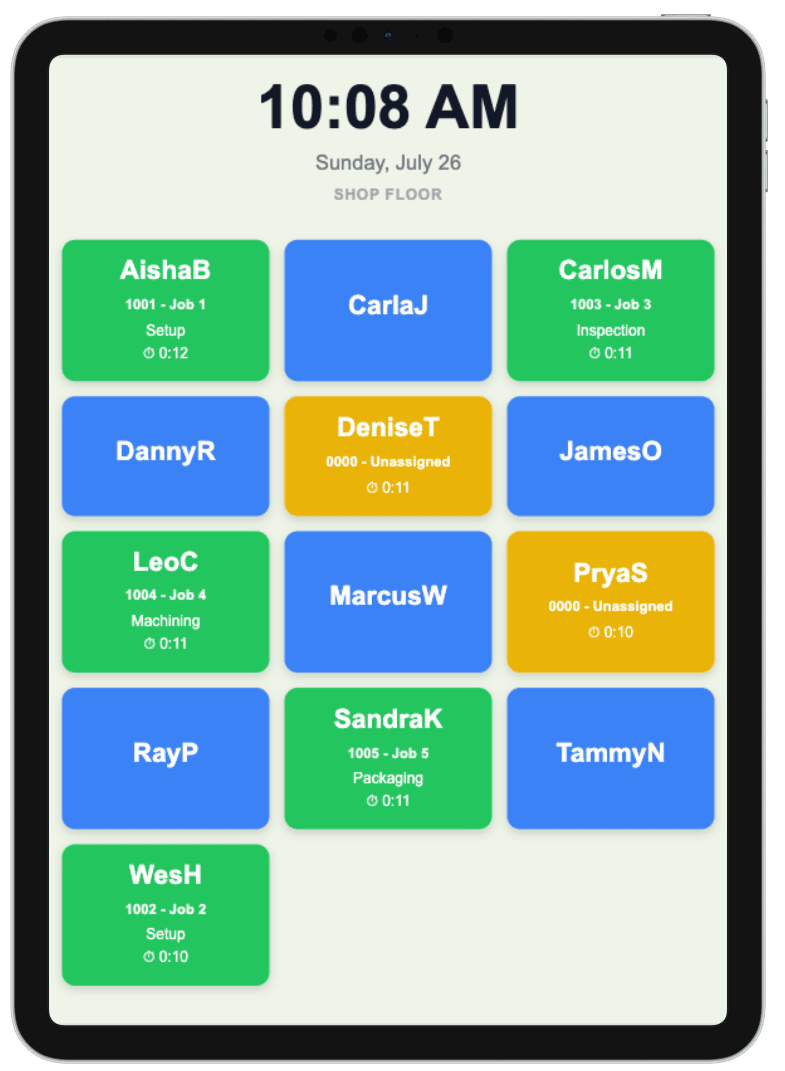
PIN Clock-In
Employees quickly clock in using a simple PIN interface.
Real-Time Dashboard
Managers can instantly see active employees and shifts.
Tablet Friendly
Optimized for iPads, kiosks, and shared employee stations.
Up and running in minutes
No training required. No hardware to buy.
Set up your account
Sign up, add your employees, and assign each one a PIN. Takes less than five minutes.
Place your kiosk
Open the TapIn kiosk on any tablet, iPad, or shared computer. Mount it at your entrance or workstation.
Employees tap in
Staff select their name and enter their PIN to clock in or out. You see hours and activity in real time.
Built for how your team actually works
Configure TapIn to match your operation — from simple clock-ins to detailed job and task tracking.
PIN Clock-In
Employees tap their name and enter their PIN to clock in and out. Nothing else required. Ideal for teams that just need accurate hour totals without extra steps.
Track Time by Job
Employees select a job or work order at clock-in. Perfect for machine shops and manufacturers who need to know exactly how many labor hours went into each job.
Full Labor Detail
Employees select both a job and a task — such as Setup, Machining, Assembly, or Inspection. Gives you a granular breakdown of exactly where time is being spent across every job.
Department Segmentation
Organize employees by department and assign dedicated kiosks to each area of your facility. Each kiosk only shows the employees assigned to it, keeping clock-ins fast and distraction-free.
Simple, transparent pricing
Start free for 60 days. No credit card required.
Frequently asked questions
Everything you need to know before getting started.
- What devices does TapIn work on?
- Any tablet, iPad, or computer with a web browser — including older, inexpensive hardware. A $50 Android tablet from eBay works just as well as the latest iPad. No app to install, no minimum specs required.
- How long does setup take?
- Most businesses are up and running in under 15 minutes. Sign up, add your employees, assign PINs, and open the kiosk on any device. No IT help needed.
- Do employees need a login or smartphone?
- No. Employees simply tap their name and enter their PIN on the shared kiosk. Nothing to download, no account needed, no personal device required.
- Can multiple locations use TapIn at the same time?
- Yes. You can set up separate kiosks for different departments or locations, all managed under one account. Each kiosk can be configured independently.
- Is my employee data secure?
- Yes. All data is encrypted and stored securely. You own your data and can export it at any time. TapIn will never sell or share your information with third parties.
- Does TapIn replace my payroll software?
- No — TapIn tracks hours and generates timecard reports. You export those into your existing payroll process. It works alongside SurePayroll, QuickBooks, Gusto, ADP, or whatever you already use.
- Can I lock the tablet so employees can only use TapIn?
- Yes — on iPad use the built-in Guided Access feature to lock the device to the TapIn kiosk page. Go to Settings → Accessibility → Guided Access, set a manager passcode, then triple-click the side button while on your kiosk URL to lock it. Employees can't exit the app or access anything else on the device. On Android tablets use the built-in Screen Pinning feature for the same result. No additional software or hardware required.
- Does TapIn work with my payroll software?
- TapIn includes a built-in export for SurePayroll and a standard CSV that works with most payroll systems. If your software requires a specific import format, send us your template and we'll add it — just email us at support@tapinhq.com. .
Get Started with TapIn
Two ways to get started — apply for early adopter access or sign up directly for a 60-day free trial.
Early Adopter Beta
A limited number of early adopters will receive a full year of TapIn completely free. Submit the form below and create your account immediately — no waiting. We'll confirm your early adopter status within 48 hours.
- ✓ 12 months free — all features included
- ✓ Direct access to the founding team
- ✓ Shape the future of the product
60-Day Free Trial
Sign up directly and get 60 days free — no credit card required. Full access to all features from day one. Cancel anytime.
- ✓ 60 days free — no card required
- ✓ Full access to all features
- ✓ Cancel anytime
No credit card required